Webhooks
Webhooks tell your systems when something happens in your Mobile Next Cloud organization: a
device becomes ready or is released, an uploaded app is verified, usage crosses a threshold.
Mobile Next sends a signed POST with a JSON body to an HTTPS URL you choose, retries until your
endpoint answers, and keeps a history of every delivery so you can inspect and resend it.
Webhooks are available to Team and Enterprise organizations. Personal workspaces and Hobby organizations can open the Webhooks page but cannot add webhooks.
This page covers setup, delivery and how to build a receiver. Two companion pages hold the details:
- Verify signatures: code for Node, Python, Go, Ruby, Java and .NET, and test vectors.
- Event types: every event, its
dataand an example body.
Quick start
Only organization admins can add, change or test webhooks. Every member can see the list.
-
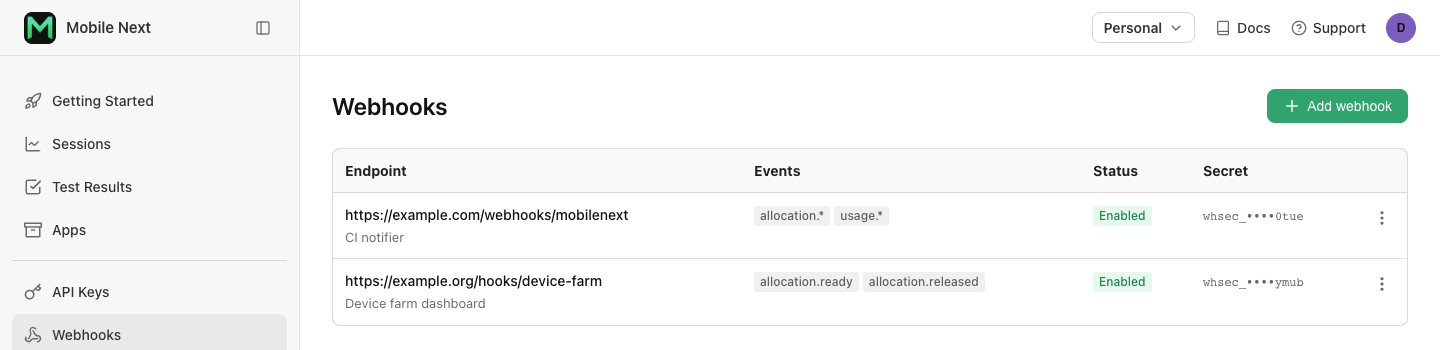
In the web app, open Webhooks and choose Add webhook.
-
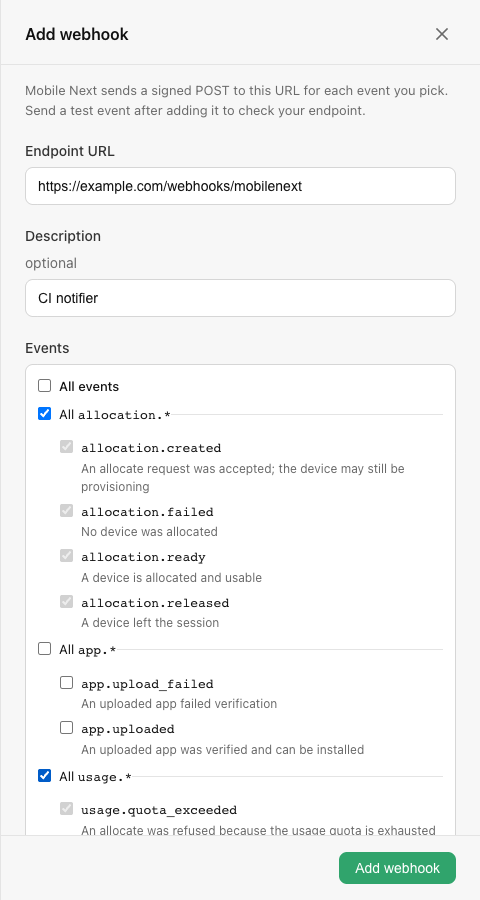
Enter your endpoint's URL, an optional description, and pick the events to send. Pick a group such as All allocation.* to also receive event types added to that group later.
-
Choose Add webhook. The signing secret is shown once: copy it now and store it where your receiver can read it, such as a secrets manager. Afterwards only its last four characters are shown.

-
Open the webhook and choose Send test event. A
webhook.testevent is sent to this webhook only. Its row shows Succeeded once your endpoint answers with a 2xx status.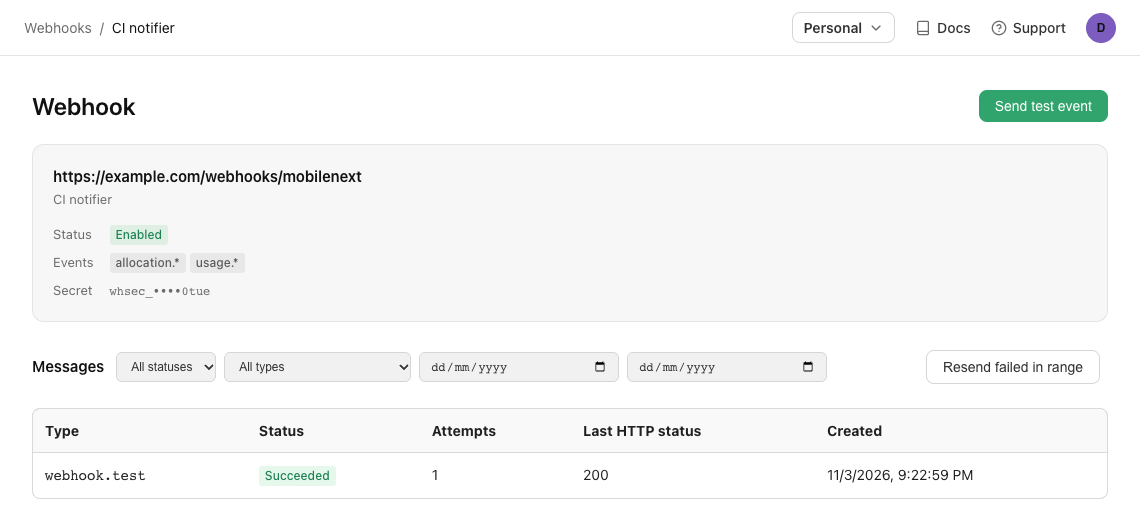
-
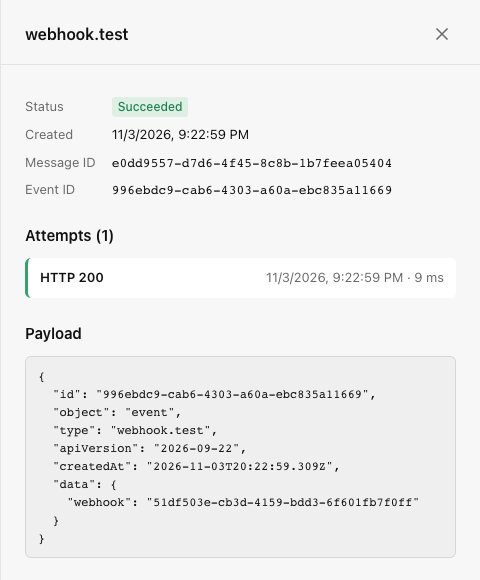
Choose a message to see its payload and every attempt: when it was made, the HTTP status your endpoint returned, how long it took, and the start of the response body. Resend delivers it again.
Your URL must use https, must not contain a username or password, and must resolve to a
public address. Mobile Next does not call it when you add it; send a test event to check it.
Send events to Slack
Paste a Slack incoming webhook URL
(https://hooks.slack.com/services/...) as the webhook's URL. Slack only accepts its own message
format, so Mobile Next sends each event to that URL as a Slack message instead of the event JSON:
- the event type, such as
app.uploaded, as the title; - the plain values of
data(text, numbers, true/false), such asappName,versionandurl; nested objects, such as an allocation'sdevice, are left out; - the event id and time.
Retries, the message history and Resend work as for any webhook. The history shows the event JSON, not the Slack message.
How it works
Webhook. One endpoint: a URL, the events it receives, a signing secret and a status
(enabled or disabled). A webhook receives the events of the whole organization. An
organization can have up to 10 webhooks (25 on Enterprise), and two webhooks may share a URL.
Event. One thing that happened, such as allocation.released. It has an id, a type, a time
and a data object. A webhook only receives events that happen while it is enabled; it never
receives earlier ones.
Message. One event addressed to one webhook. Every retry and every resend of it is the same message.
Attempt. One HTTP POST of a message.
Event id and message id
Each delivery carries two ids, and they answer different questions:
| Where | Same across | |
|---|---|---|
| Event id | body id | every webhook that receives the event, every retry, every resend |
| Message id | webhook-id header | every retry and resend to this webhook; differs between webhooks |
Deduplicate on the event id. If two of your webhooks point at the same receiver, they deliver the same event twice with two message ids but one event id.
The request
POST /webhooks/mobilenext HTTP/1.1
Content-Type: application/json
User-Agent: MobileNext-Webhooks/1
webhook-id: 2f6b1c3a-8d4e-4b7f-9a1c-5e2d3f4a6b7c
webhook-timestamp: 1790000000
webhook-signature: v1,1xPyhRV/UPW2y1MaASMXIt9Qrrq4UpaskY7bYNvk2LE=

{"id":"5d2a8f3e-1b4c-4d6e-9f0a-2b3c4d5e6f7a","object":"event","type":"webhook.test","apiVersion":"2026-09-22","createdAt":"2026-09-21T14:13:20.117Z","data":{"webhook":"1d2e3f4a-5b6c-4d7e-8f9a-0b1c2d3e4f5a"}}
webhook-id: the message id.webhook-timestamp: when this attempt was sent, in Unix seconds. It is new on every attempt.webhook-signature:v1,and a base64 HMAC-SHA256 of the request. While a secret is being rotated it holds two signatures separated by a space. See Verify signatures.
The body is the event:
| Field | |
|---|---|
id | Event id. |
object | Always event. |
type | The event type. It decides the shape of data. |
apiVersion | The payload version, a date: 2026-09-22. Breaking changes get a new date and are announced; new fields can appear at any time. |
createdAt | When the event happened. |
data | Depends on type. See Event types. |
The format is Standard Webhooks, so the standardwebhooks
and svix libraries verify it without changes.
Delivery
At least once, in any order
A message is delivered at least once while its retries last. A network failure after your
endpoint processed a request, a timeout, or a resend can each deliver it again. Deduplicate on
the event id. After the 8th attempt fails the message is failed and is not retried on its
own; watch for failed messages and resend them.
Messages are not ordered. A retry can arrive after a newer event, so an allocation.ready
can arrive after the allocation.released of the same allocation. Use the event's state, not
its arrival order: every allocation.* event carries data.allocationStatus, and the
lifecycle rank tells you which one is newer.
Success and retries
An attempt succeeds when your endpoint answers with any 2xx status within 10 seconds. Anything else is a failure: another status, a timeout, a connection or TLS error. Redirects are not followed.
A failed message is retried on this schedule, 8 attempts over about 27.5 hours:
| Attempt | Sent |
|---|---|
| 1 | Immediately |
| 2 | 5 seconds after attempt 1 |
| 3 | 5 minutes after attempt 2 |
| 4 | 30 minutes after attempt 3 |
| 5 | 2 hours after attempt 4 |
| 6 | 5 hours after attempt 5 |
| 7 | 10 hours after attempt 6 |
| 8 | 10 hours after attempt 7 |
A message is pending until it succeeds (succeeded) or attempt 8 fails (failed). Deleting
the webhook cancels its pending messages (canceled).
Resend
Open the message and choose Resend, or call
POST /api/v1/webhooks/{webhookId}/messages/{messageId}/resend. A resend of a succeeded or
failed message makes exactly one new attempt now; the retry schedule does not start over. A
resend of a pending message moves its next attempt to now.
After an outage on your side, pick a date range on the webhook's messages and choose Resend failed in range: every failed message in that range is resent once.
Messages, their payloads and attempts are kept for 30 days. A message can be resent until it is 29 days old.
Disabled webhooks
You can disable a webhook from its menu. A disabled webhook gets no new messages; messages already pending keep retrying, so nothing queued is lost. Enable turns it back on. You can send a test event to a disabled webhook to check a fix first.
A webhook is disabled automatically when it has had no 2xx response for 72 hours and at least 5 of its messages failed in that time. Your organization's admins get an email when that happens. Fix the endpoint, send a test event, then enable it again.
Build a receiver
Your endpoint has 10 seconds to answer. Don't do the work in the request; record the event and answer.
- Read the raw body. Verify the signature against the exact bytes you received, before parsing JSON. Many frameworks parse the body for you; turn that off for this route.
- Verify the signature and timestamp with your webhook's secret, as shown in
Verify signatures. Answer
400or401if it fails. - Store it, deduplicated. Insert the event id and the raw body into a table with a unique
key on the event id. If the insert fails because the key exists, you already have this
event: answer
200and stop. - Answer 2xx once the row is committed.
- Process it asynchronously from that table, in a worker or queue. Make the work itself idempotent, or mark the row processed in the same transaction as the work.
- Keep the rows at least 30 days, the window in which a message can be resent.
CREATE TABLE webhook_inbox (
  event_id     VARCHAR(36) PRIMARY KEY,  -- body "id"
  type         VARCHAR(64) NOT NULL,
  body         TEXT        NOT NULL,     -- the raw body, as received
  received_at  TIMESTAMP   NOT NULL DEFAULT CURRENT_TIMESTAMP,
  processed_at TIMESTAMP   NULL
);
When in doubt about the current state of a resource, read it from the REST API.
Rotate the secret
Choose Rotate secret from a webhook's menu, or call
POST /api/v1/webhooks/{webhookId}/rotate-secret. The new secret is shown once.
- Rotate keeps the current secret signing for 24 hours. Every request carries two signatures, one per secret, so your receiver keeps working with either. Deploy the new secret within that time. A second normal rotation is refused while the first one's 24 hours last.
- Rotate immediately stops the current secret now. Use it if the secret leaked.
Manage webhooks with the API
Everything in the web app is also in the REST API, with an API key. Reads work for every member; changes need the API key of an organization admin.
| Method | Path | |
|---|---|---|
GET | /api/v1/webhooks/event-types | The event types you can subscribe to |
POST | /api/v1/webhooks | Add a webhook; the response has the secret, once |
GET | /api/v1/webhooks | List webhooks |
GET | /api/v1/webhooks/{webhookId} | Get one webhook |
PATCH | /api/v1/webhooks/{webhookId} | Change url, description, events or status |
DELETE | /api/v1/webhooks/{webhookId} | Delete a webhook and its history |
POST | /api/v1/webhooks/{webhookId}/rotate-secret | New secret; expireCurrentIn seconds of overlap, 0 to 86400 (default) |
POST | /api/v1/webhooks/{webhookId}/test | Send a webhook.test event; returns the message |
GET | /api/v1/webhooks/{webhookId}/messages | Messages, newest first; filter by status, type, createdAfter, createdBefore |
GET | /api/v1/webhooks/{webhookId}/messages/{messageId} | One message; admins also get its payload and attempts |
POST | /api/v1/webhooks/{webhookId}/messages/{messageId}/resend | Deliver it again now |
curl -s https://app.mobilenext.ai/api/v1/webhooks \
  -H "Authorization: Bearer $MOBILENEXT_API_KEY" \
  -H 'Content-Type: application/json' \
  -d '{"url": "https://example.com/webhooks/mobilenext", "description": "CI notifier",
       "events": ["allocation.*", "usage.*"]}'
{
  "id": "6f1c8e4a-1f2b-4a1e-9a2c-0b7f5d3e6a11",
  "object": "webhook",
  "url": "https://example.com/webhooks/mobilenext",
  "description": "CI notifier",
  "events": ["allocation.*", "usage.*"],
  "status": "enabled",
  "disabledReason": null,
  "secretSuffix": "x7Qk",
  "organization": "0b7f5d3e-6a11-4a1e-9a2c-6f1c8e4a1f2b",
  "createdAt": "2026-09-22T10:00:00Z",
  "updatedAt": "2026-09-22T10:00:00Z",
  "secret": "whsec_MfKQ9r8GKYqrTwjUPD8ILPZIo2LaLaSw"
}
events takes exact event types, a group such as allocation.*, or ["*"] for everything.
Sending a test event is limited to 10 per webhook per minute, and resending to 60.
FAQ
Why did I get the same event twice?
Delivery is at least once. The usual causes: your endpoint took longer than 10 seconds or the
connection dropped, so the attempt counted as failed and was retried even though you had
processed it; someone resent the message; or two of your webhooks receive the same event.
Deduplicate on the body id, which is the same in all these cases.
Why did events arrive out of order?
Messages are retried independently, so a retried older event can arrive after a newer one.
Don't rely on arrival order or on createdAt alone. For an allocation's current state, keep the highest
lifecycle rank you have seen per allocation; a lower-ranked
event doesn't move it back, but still tells you what happened, such as when the device became
ready.
Why was my endpoint disabled?
It had no 2xx response for 72 hours and at least 5 messages failed in that time. Open the webhook, filter messages by Failed, and open one to see what your endpoint answered on each attempt. Fix it, send a test event, then choose Enable. Resend the failed messages you still need; they are not resent automatically.
Why did signature verification fail?
The most common causes: the body was parsed and re-serialized before verifying, the secret is
from another webhook or was rotated, the whsec_ prefix was not removed before base64
decoding, or your server's clock is more than 5 minutes off. See
Verify signatures.
Can I receive webhooks on localhost?
No. The URL must resolve to a public address. Use a tunnel that gives you a public HTTPS URL while developing.