GitHub integration
The GitHub integration lets agents on your Mac build instances clone, push and open pull requests
on the repositories you choose. An admin connects GitHub once for the organization. After that,
git and gh just work on every Mac the organization allocates: no personal access tokens, no
gh auth login.
Commits and pull requests are authored by mobile-next[bot].
Connect GitHub
Only organization admins can connect or disconnect GitHub. Read-only and read/write members see the connected accounts but no buttons.
-
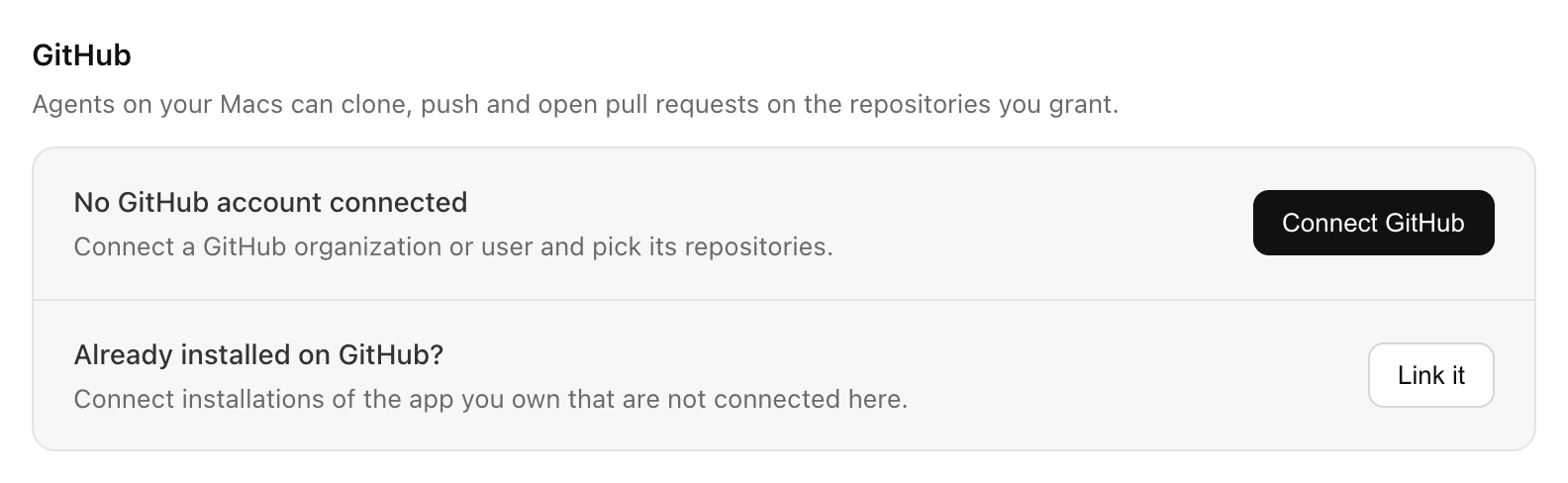
In the web app, open Settings and choose the Integrations tab.
-
Choose Connect GitHub. GitHub opens and asks you to install the Mobile Next app.
-
Pick the GitHub organization or user account, then All repositories or Only select repositories, and confirm.
-
GitHub returns you to Settings → Integrations, which shows GitHub connected. and the account with the repositories it grants.
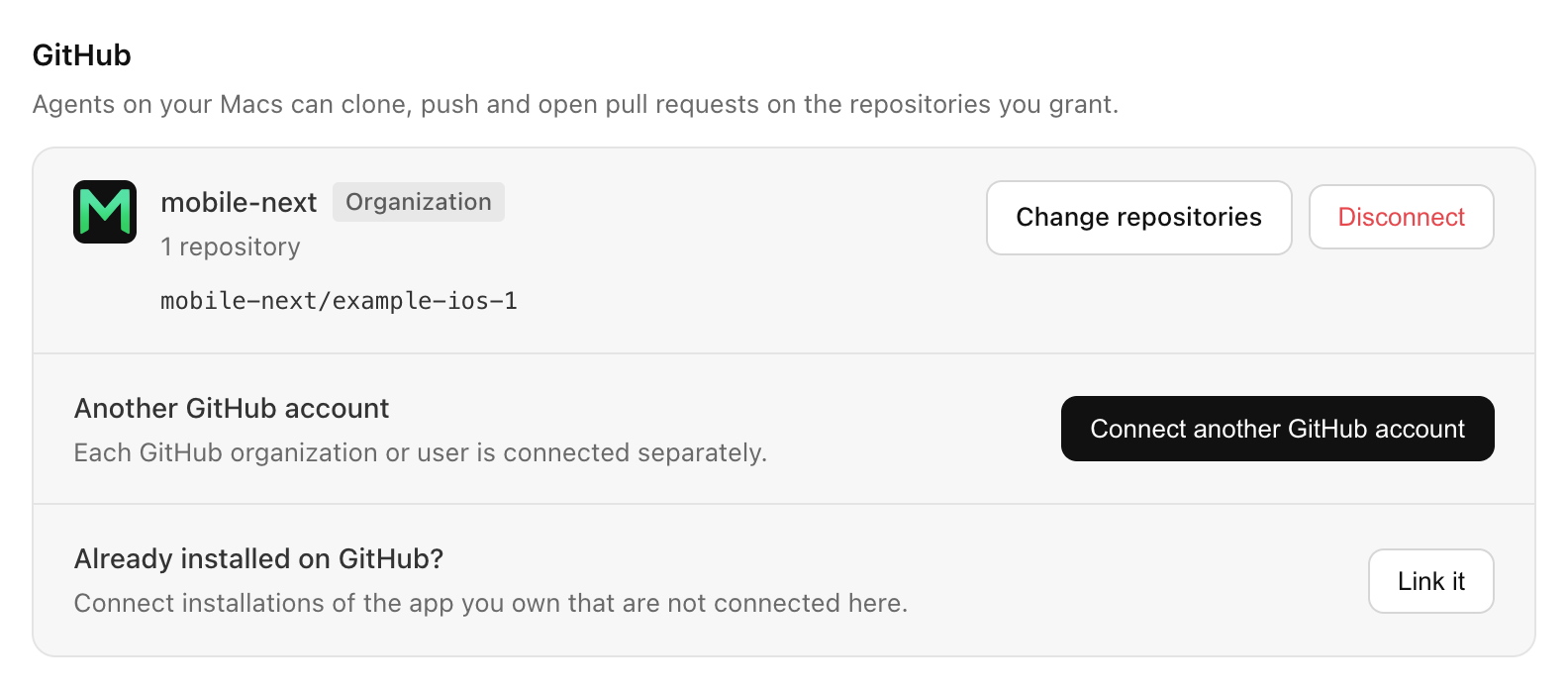
To connect a second GitHub organization or user account, choose Connect another GitHub account. Each one is connected separately.
If you are a member of the GitHub organization but not one of its owners, GitHub sends an installation request to the owners instead. The page shows An owner of the GitHub organization must approve. Click Connect again after they do.
Link an existing installation
GitHub does not return to Mobile Next when the app is already installed on that GitHub account. This happens after you disconnect and want to reconnect, or when a second Mobile Next organization uses the same GitHub organization. In that case choose Already installed on GitHub? Link it. After you authorize on GitHub, every installation of the app that you own and that this organization has not connected yet is linked.
Choose repositories
Which repositories are granted is set on GitHub. Choose Change repositories next to the
account to open the app's installation settings on GitHub, then add or remove repositories.
Nothing needs to be saved in Mobile Next: a repository you add is available to the next git or
gh command.
Use git and gh on a Mac
On a Mac build instance allocated by your organization, git and gh are already signed in for
the granted repositories. An agent can use them through its shell tool as usual:
gh repo clone acme/ios-app && cd ios-app
git switch -c fix/login
# ...edit files...
git commit -am "Fix login"
git push -u origin fix/login
gh pr create --fill
The push and the pull request look like this:
To https://github.com/acme/ios-app.git
 * [new branch]      fix/login -> fix/login
branch 'fix/login' set up to track 'origin/fix/login'.
https://github.com/acme/ios-app/pull/42
Commits are authored by mobile-next[bot] <361312149+mobile-next[bot]@users.noreply.github.com>.
git clone https://github.com/acme/ios-app works too.
A repository that is not granted fails with git's normal authentication error, and a line that names the connected accounts:
mobilenext: acme/other-app is not granted to this organization. Connected GitHub accounts: acme. An admin can add it in Settings → Integrations.
Only repositories granted to the GitHub accounts connected to the organization that allocated the Mac are reachable. Repositories connected to your other Mobile Next organizations are not.
Permissions
The Mobile Next GitHub app asks for:
| Permission | Access | Used for |
|---|---|---|
| Contents | Read and write | Clone, fetch and push |
| Pull requests | Read and write | Create and update pull requests |
| Workflows | Read and write | Push changes to .github/workflows files |
| Metadata | Read | Required by GitHub for every app |
| Organization members | Read | Only to check that the person connecting is an owner of the GitHub organization |
The app subscribes to no webhooks.
Security and token lifetimes
- Each token is minted for one repository, when
gitorghneeds it. - A token is valid for at most one hour, and is revoked when the Mac is released.
- Tokens are never written to disk on the Mac.
- Only repositories granted to the organization's connected GitHub accounts can get a token.
Anyone, or any agent, running on the Mac can use these tokens while they are valid. A token with write access to a repository can push a branch whose workflows or build scripts run in GitHub Actions. Keep secrets used by GitHub Actions in protected environments, or otherwise make sure jobs that hold secrets do not run code from unreviewed branches.
Disconnect and uninstall
Choose Disconnect next to the account and confirm.
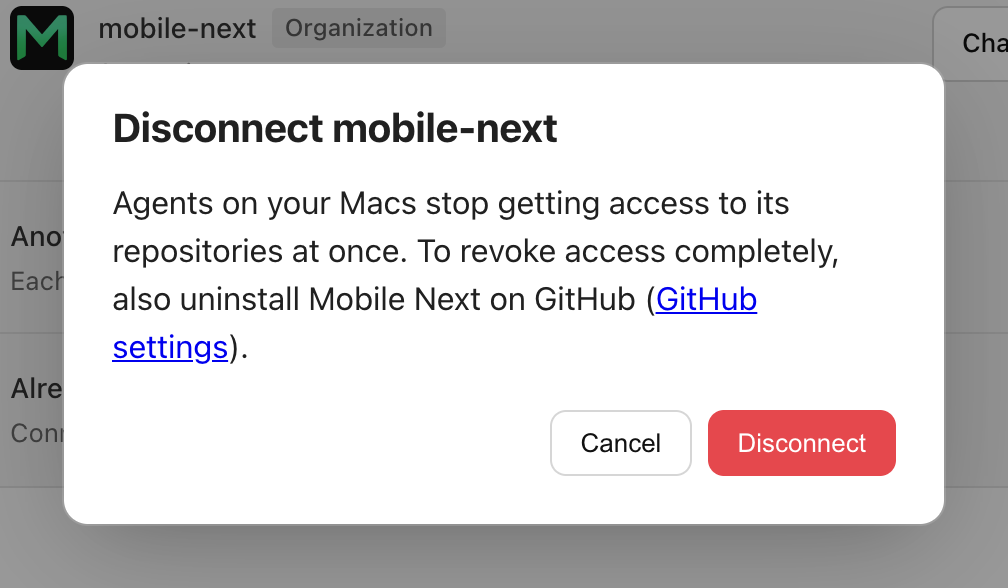
Disconnect stops new tokens at once. Tokens already issued stop working when their Mac is released, or within one hour. The app stays installed on GitHub, because another Mobile Next organization may use the same installation. To remove access completely, also uninstall the Mobile Next app on GitHub: open GitHub settings from the dialog, or the organization's Settings → GitHub Apps page on GitHub.
If the app is uninstalled or suspended on GitHub first, the account shows Removed on GitHub, with Reconnect and Remove.
Troubleshooting
... is not granted to this organization. The repository is not in the grant of any
connected GitHub account. An admin adds it with Change repositories, or connects the GitHub
account that owns it.
GitHub was not connected. After returning from GitHub, the page may show GitHub was not connected. followed by one of these:
| Message | What to do |
|---|---|
| The connect link expired. Click Connect again. | The link is valid for 10 minutes. Start again. |
| You started connecting GitHub as a different Mobile Next user. | Sign in to Mobile Next as the user who started, or start again. |
| Only an admin of this organization can connect GitHub. | Ask a Mobile Next admin of the organization to connect it. |
| You must be an owner of the GitHub organization to connect it. | Ask a GitHub organization owner to connect it, or to make you an owner. |
| That GitHub installation belongs to another GitHub user. | Sign in to GitHub as that user, then start again. |
| That GitHub installation is not one you can manage. | Connect as an owner of that GitHub organization, or as the GitHub user it is installed on. |
| That kind of GitHub account cannot be connected. | Install the app on a GitHub organization or user account. |
| Nothing to link: no installation you own on GitHub is waiting. | Every installation you own is already connected, or none exists yet. Use Connect GitHub. |
| An owner of the GitHub organization must approve. | A GitHub organization owner must approve the request on GitHub. Then choose Connect GitHub again. |
| GitHub did not answer, or GitHub did not confirm your sign-in. | Wait a minute and start again. |
| Something went wrong on our side. | Wait a minute and start again. If it repeats, contact support. |
GitHub stops at "already installed". Use Already installed on GitHub? Link it.